Why Plycast?
I read widely—novels and nonfiction from many authors, including works in languages I do not speak fluently—so I often rely on translations and adaptations. In day-to-day life I rarely have long stretches to sit with a book; audiobooks fit my schedule better. In practice, though, many titles I care about have no audiobook yet, official releases lag, or I still wait on converted or localized versions.
I often already have the book or ebook; what I still want is a voice reading it to me—the experience audiobooks deliver when they exist. Those gaps pushed me to build something that makes this workflow easier for me, and I suspect others run into the same friction.
At a glance
- In: common document formats (e.g. text, Markdown; optional paths for PDF, Word, and image-based text with OCR).
- Through: chunked translation (self-hosted or LLM-assisted, depending on what you configure).
- Out: speech via pluggable TTS—system voices, espeak-style engines, or optional neural stacks where you set them up.
- How: install from PyPI, run the
plycastCLI, or call the library from Python.
Quick demo
Below is a copy-paste command, then what you get on disk: a translated .txt and an audio file. Replace paths or flags with whatever you use locally (venv, API keys, --translator, --tts).
Source file (input)
The demo uses this page image as the only input—nhat-ky-nu-phap-y-c1.png (same file in the repo). Plycast OCR (Vietnamese) → translate → TTS (English).

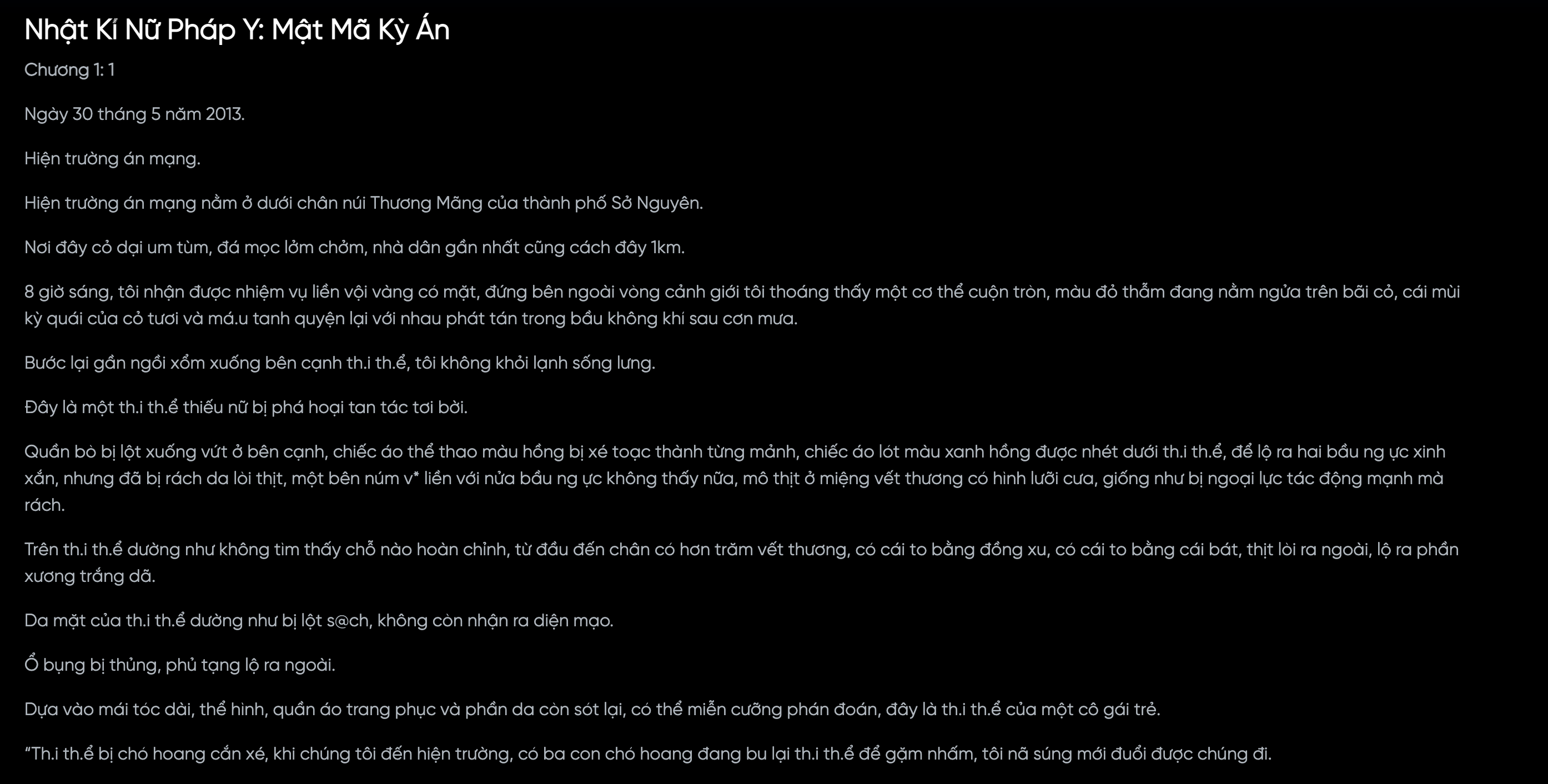
Example command
Full pipeline (Vietnamese → English) with LLM translation and macOS speech—run from a clone with the file at examples/input/nhat-ky-nu-phap-y-c1.png:
export OPENAI_API_KEY='your-key-here'
plycast convert examples/input/nhat-ky-nu-phap-y-c1.png \
  -s vi -t en -o ./dist \
  --translator llm --llm-model gpt-4o-mini \
  --tts system_say --voice "Samantha"
(Plycast reads OPENAI_API_KEY for --translator llm; optional .env in the working directory works too.)
For more reading natural voice, using Neural TTS instead of say (English audio; install pip install 'plycast[parler]' first):
plycast convert examples/input/nhat-ky-nu-phap-y-c1.png \
  -s vi -t en -o ./dist \
  --translator llm --llm-model gpt-4o-mini \
  --tts parler --parler-voice laura --parler-gender female \
  --audio-format mp3
Translation output (excerpt)
From that PNG source, Plycast writes translated text next to the audio, typically <stem>.<target-lang>.txt under your output directory (e.g. dist/nhat-ky-nu-phap-y-c1.en.txt—same basename as the image).
Naughty Girl’s Magical Spell: A Strange Case
Chapter 1
On April 5, 2015.
Crime scene.
The crime scene is located beneath the Thương Mõng mountain in the city of Sở Nguyên. The area is overgrown with dense grass, with scattered bushes and some trees also present…
(Excerpt from the translated text for this sample; LLM output can vary slightly between runs.)
Audio
By default you get an MP3 (or another --audio-format you set), e.g. dist/nhat-ky-nu-phap-y-c1.en.mp3.
English audio from a real run starting from the PNG source above (same pipeline as the excerpt):
What ships today
Plycast is a real installable package (PyPI: plycast), not a sketch repo: pyproject.toml, a plycast CLI, docs, and examples aimed at a quick first run.
Roughly in place:
- Pipeline: get text from a file → optional translation → synthesize audio (e.g. MP3 where your stack supports it).
- Flexibility: optional extras for document parsing and heavier TTS stacks, so installs stay lean until you opt in.
- Docs + examples: README and deeper docs for CLI flags, languages, and troubleshooting.
The emphasis is local-first, composable steps—bring your own keys or servers where APIs apply—rather than a single locked-in vendor story.
Roadmap
- Translation: integrate more LLM providers and models so you can pick what fits your languages, latency, and budget—not a single fixed stack.
- Speech: add more TTS backends so listening quality stays strong across more languages, with natural-sounding options where the ecosystem supports them.
- Reliability: broader automated tests and clearer errors when an optional dependency (OCR, ffmpeg, a given TTS backend) is missing.
- Docs & examples: more copy-paste recipes and small end-to-end samples for common language pairs and setups.
- UX: polish CLI defaults and messages based on real usage.
Longer term I want Plycast to stay easy to adopt and honest about what runs locally vs. what calls an API—so people can choose their own comfort level.
Links
- Source & issues: github.com/latoi-hub/plycast
- Package: pypi.org/project/plycast